Showing posts with label EPPD1063. Show all posts

Tuesday, November 23, 2021

HTML (Hyper Text Markup Language)

HTML is the standard markup language for documents designed to be displayed in a web browser. We can use it to define the content of the article, title, link, image, and other elements on the website so that the browser is aware of the website's overall structure. It can be assisted by technologies such as Cascading Style Sheets (CSS) and scripting languages ​​such as JavaScript. CSS is a programming language for adding styles to web pages. To put it another way, it's a tool that lets you change the font style, colors, web page background, and even add gorgeous animation and 3D effects to your website, giving it a sense of design.

Below is a basic HTML examples:


You don't need any special software to make HTML pages; all you need is a word processor (such as Microsoft Word, Notepad, WordPad, etc.) and a basic understanding of how HTML works. The basic HTML page begins with the <html> tag and concludes with </html>. The title and the body are the only two sections of the page. When saving, need use.htm or.html as the extension so that the browser can comprehend and execute it. 

Benefits of HTML is
1. simple to understand and edit
2. supported by all Browsers
3. easy to modify the page structure of your website and blog
4. easily detect if website is attacked with webpage Trojan
5. try optimization of a website

Video 1: HTML Tutorial for Beginners 

Saturday, November 13, 2021

Excel Functions And Mail Merge

Microsoft Excel is a desktop spreadsheet application used by both individuals and businesses to handle activities ranging from basic calculations to the creation of huge, complicated financial models. It has become the world's most universal calculation and analysis tool as a result of this architecture. It includes tools for calculating, graphing, pivot tables and others. We can directly enter numbers, text, dates, and other data into the cell, or the cell can be calculated using formulas. Below is some functions I'm learn from my course: 

-UPPERLOWER, or PROPER functions to automatically change the case of existing text to uppercase, lowercase, or proper case. 

-COUNT for counts how many cells in a range contain numeric data; 

-COUNTBLANK counts how many blank in a range; 

-COUNTIF counts how many cells in a range meet a certain condition.

-VLOOKUP When you need to search a table or a range by row. 

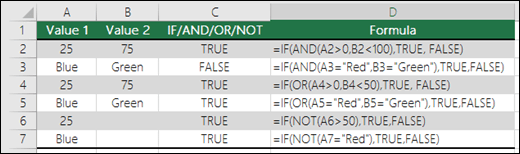
-IF (Something is True, then do something, otherwise do something else) 

-AND =IF(AND( Something is True, Something else is True), Value if True, Value if False)

-OR =IF(OR(Something is True, Something else is True),Value if True, Value if False)


Beside that, we also can use mail merge from Excel to Microsoft Word for bulk directory, email, letters, labels, and envelopes. Directory that lists a batch of information for each item in a data source. It can be used to print a contact list or to create lists of data, such as invoices form each debtors in business. Through Excel sheet, the complex calculations become easy, data visualizations with charts are simple to create, data with millions of rows should be stored in a database and others.

                                    
                Video 1: Intermediate Excel Skills,      Video 2: Mail Merge from Excel To Word
                     Tips, and Tricks Tutorial


Thursday, November 4, 2021

Advantages of Microsoft Word and Table of Content

Microsoft Word  is a word processing software developed by Microsoft. Word not only write text, but also can insert graphics, photos, and a colorful cover page. It is used by people of many professions and identities, particularly bloggers, writers, journalists, columnists, and students. We need Word to perform any activities, whether it's making spreadsheets, blogs, scripts,  letter, notes, or documents. we can also  store documents to OneDrive, which is a Microsoft cloud storage solution built into many of its products. With OneDrive, you can back up files without losing data if your local hard drive crashes.

Microsoft Word has a function help us to create a table of content, the table of contents is a snapshot of the headings and page number in a document. This can let reader better comprehend content of each part of the article. Besides that, we also can insert a list of table and figure in an assignment or journal articles, making it easier to find each table or figure in which chapter and saving time searching through in long articles. At the last, we can insert citation and references own in task bar references, which including book, journal articles, report and others. At the articles first page, many type of cover page can be choose and built in from Microsoft Word, making it more complete and interesting.  


 Video 1: How to create a table of contents in Microsoft Word


Friday, October 22, 2021

Blogger

Blogger is a platform that provides blog services for every user in the world. Users can easily create, publish, maintain and modify their own blogs. Blogger also launched a mobile application for users who use mobile devices. Therefore, users are allowed to edit blogs and publish blogs anywhere through the application. Many types of blog content can be published, such as art, photography, video, music, etc., except for text-based content. This will be more interesting and creative for readers. Pictures and videos can be selected from own photo library or other websites (such as google image or Youtube).

Through blogger, we can record personal life by posting diary to record what happens in daily life and share it with friends or netizens. Besides that, share information on blog be able useful to help student in learning by posting own lecture notes. Furthermore, we can convey the idea of personal freedom including politics, economics, editorials, technology. But need pay attention to whether there are legal defamation, obstruction of publicity, intellectual property rights and other issues in the article. Other, we do not write detailed personal information on blog, it will cause personal safety to ourselves.


Video 1: Tutorial for beginners Blogger